
Save Like a Pro: The Ultimate Savings Tracker Template List
The Best Savings Tracker Templates at a Glance
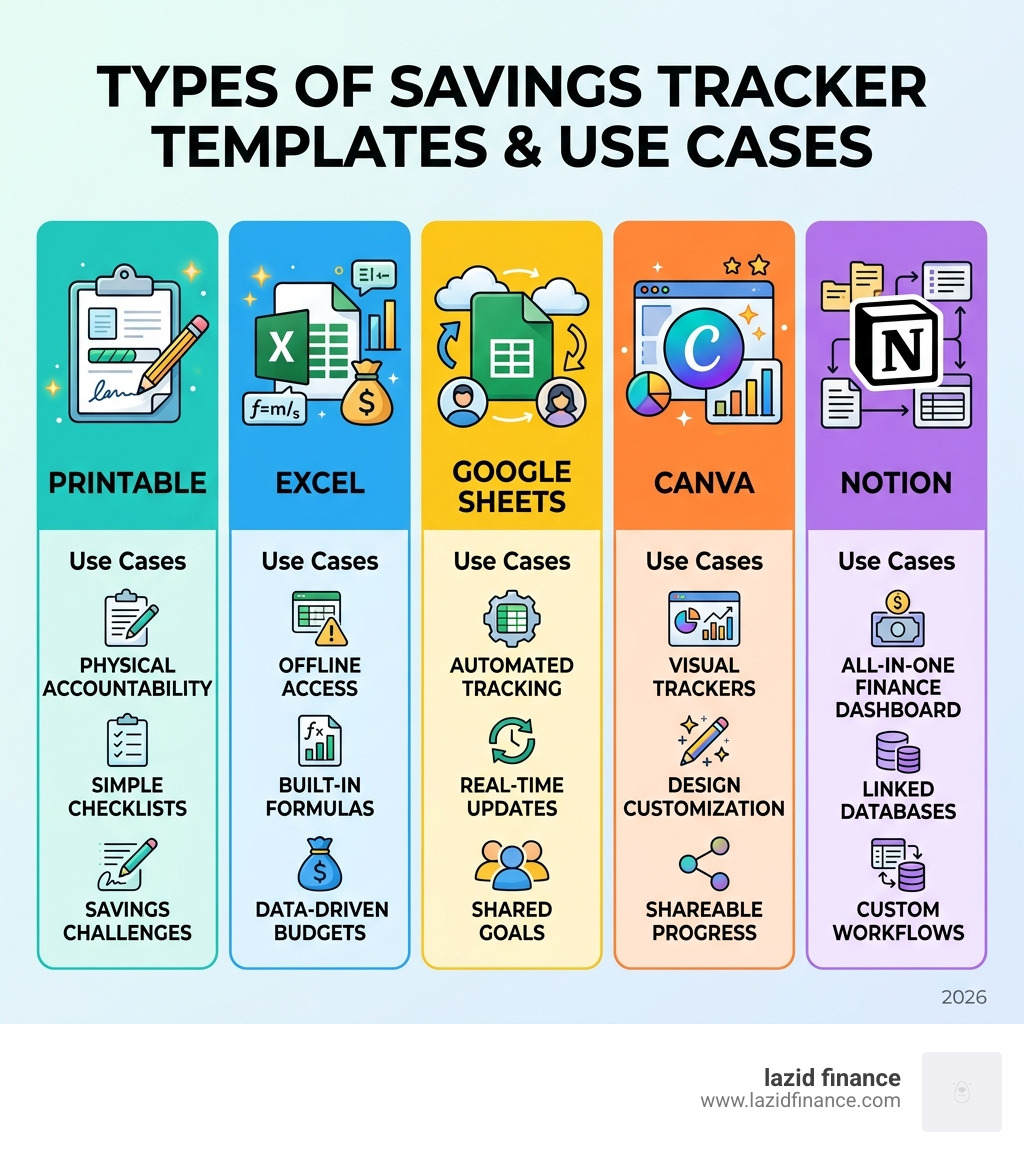
A savings tracker template is one of the fastest ways to take control of your money and actually hit your financial goals. Here are the top options to get started right now:
| Template Type | Best For | Where to Get It |
|---|---|---|
| Google Sheets | Automated tracking, multiple goals | Free via Google Drive |
| Microsoft Excel | Offline use, built-in formulas | Microsoft Excel Templates |
| Canva | Visual, design-forward trackers | Free via Canva |
| Printable PDF | Physical accountability, challenges | Pinterest, BudgetJar |
| Notion | All-in-one finance management | Notion Template Marketplace |
The numbers are hard to ignore. Roughly 70% of Americans live paycheck to paycheck — with little or nothing set aside for emergencies, let alone bigger goals. A simple tracker won’t fix everything, but it closes the gap between wanting to save and actually doing it.
The problem isn’t always income. It’s visibility.
When you can’t clearly see how much you’ve saved, how far you are from your goal, or where your money went last month, it’s almost impossible to stay consistent. A good savings tracker template makes all of that visible — in minutes, not hours.
Whether you prefer a colorful printable, an auto-calculating spreadsheet, or a minimal digital dashboard, there’s a format that fits how you think and how you live. This guide covers the best options available in 2026, what to look for, and how to use them.
Why You Need a Savings Tracker Template in 2026
As we navigate through April 2026, the financial landscape continues to shift, but the fundamentals of personal finance remain as vital as ever. We’ve all felt the pinch of rising costs, and the statistic that 70% of people are living paycheck to paycheck is a sobering reminder that without a plan, money tends to disappear.
This is where a savings tracker template becomes your best friend. It isn’t just a piece of paper or a digital file; it’s a commitment to your future self. Senator Elizabeth Warren famously popularized the 50/30/20 budget rule, which suggests allocating 50% of your net income to needs, 30% to wants, and 20% to savings and debt repayment. While that sounds great on paper, actually hitting that 20% mark requires a level of organization that most of us don’t have naturally.
A tracker provides the structure needed to:
- Visualize progress: Seeing a bar chart grow or a jar fill up provides a dopamine hit that keeps you motivated.
- Identify surpluses: When you track your actual spending against your projected budget, you often find “hidden” money that can be diverted to your emergency fund.
- Create accountability: It’s easy to skip a month of saving when it’s just a vague idea in your head. It’s much harder when there’s a blank cell in your spreadsheet staring back at you.
For those who prefer a robust, offline solution, Free budget template spreadsheets to customize | Microsoft Excel offers a range of pre-built formulas that do the heavy lifting for you. These templates allow you to compare projected vs. actual figures monthly, ensuring you stay on the right side of financial stability.
Top Types of Savings Trackers for Every Goal
Not all savings goals are created equal. You wouldn’t use the same strategy to save for a $5 coffee as you would for a $50,000 house deposit. That’s why we see a variety of tracker types tailored to specific needs.
Emergency Funds
The “rainy day” fund is the bedrock of financial peace. Experts generally recommend having at least $1,000 as a starter, eventually building up to 3–6 months of living expenses. A tracker for this goal often uses a “thermometer” style, where you color in levels as you reach milestones.
Sinking Funds
This is a strategic way to save by setting aside fixed amounts regularly for specific future expenses, such as car repairs, annual insurance premiums, or holiday gifts. Instead of one giant “savings” pile, you break it down into categories. Using a savings tracker template that supports multiple goals allows you to see exactly how much is allocated to each “bucket” without needing ten different bank accounts.
Vacation Planning
Who doesn’t love a good holiday? Tracking a vacation fund is often more fun when it’s visual. Many people use biweekly savings plans to coincide with their paychecks, ensuring the flight and hotel are paid for before they even pack a suitcase.
If you are looking for inspiration, Savings Template Free Printables – Pinterest is a goldmine. In fact, over 1,000 people searched for “savings tracker printable” on Pinterest just yesterday! It’s clear that visual accountability is a huge trend in 2026.

Best Digital Savings Tracker Template Options
For the data-lovers among us, digital trackers are the gold standard. They offer automation that printables simply can’t match.
Google Sheets is a fan favorite because it’s free, cloud-based, and accessible from your phone. You can use a Savings Goal Tracker Template for Google Sheets and Excel to set up a dashboard that updates your “Saved So Far” total every time you log a deposit.
Microsoft Excel remains the powerhouse for those who want deep customization. With a row limit of over 1 million, you could theoretically track every cent you save for the next several centuries (though we hope you hit your goals sooner than that!).
| Feature | Microsoft Excel | Google Sheets |
|---|---|---|
| Accessibility | Offline/Desktop focused | Cloud-based/Mobile friendly |
| Automation | Advanced Macros/VBA | Easy Scripts/Integrations |
| Collaboration | Good (with OneDrive) | Excellent (Real-time) |
| Cost | Part of Office 365 (Paid) | Free with Google Account |
| Templates | Thousands of built-in options | Community-driven templates |
Digital templates often include a “Status” column that leverages deadlines. If you’re behind on a goal, the cell might turn red or label the goal as “Overdue,” providing that extra nudge to skip the takeout and put the money toward your future instead.
Visual and Printable Savings Trackers
Sometimes, the best way to change a habit is to get away from the screen. Printable trackers offer a tactile experience that can be incredibly rewarding.
Free and customizable budget templates – Canva has nearly 16,000 templates available. Whether you want a minimalist aesthetic, a “Retro Y2K” look, or a “Colorful Rainbow” design, there is something for everyone.
Visual trackers like “Savings Jars” or “Coloring Pages” are particularly effective for families or those who find spreadsheets intimidating. The act of physically coloring in a square representing $10 or $100 creates a psychological connection to your progress that a digital cell sometimes lacks.
Popular Savings Challenges and How to Track Them
If you find saving boring, a “challenge” might be the spark you need. These gamified versions of saving are massive on social media and for a good reason: they work.
- The 52-Week Challenge: You save $1 in week one, $2 in week two, and so on, until you save $52 in week 52. By the end of the year, you’ve stashed away $1,378.
- The 100-Envelope Challenge: You label 100 envelopes from $1 to $100. Each day (or week), you pick one and put that amount inside. If you complete it, you’ll have $5,050.
- The Penny Challenge: You start with one penny and increase by one cent every day. By day 365, you’re saving $3.65, totaling over $667 for the year.
- No-Spend Challenge: You pick a timeframe (like a weekend or a month) where you only spend money on absolute necessities.
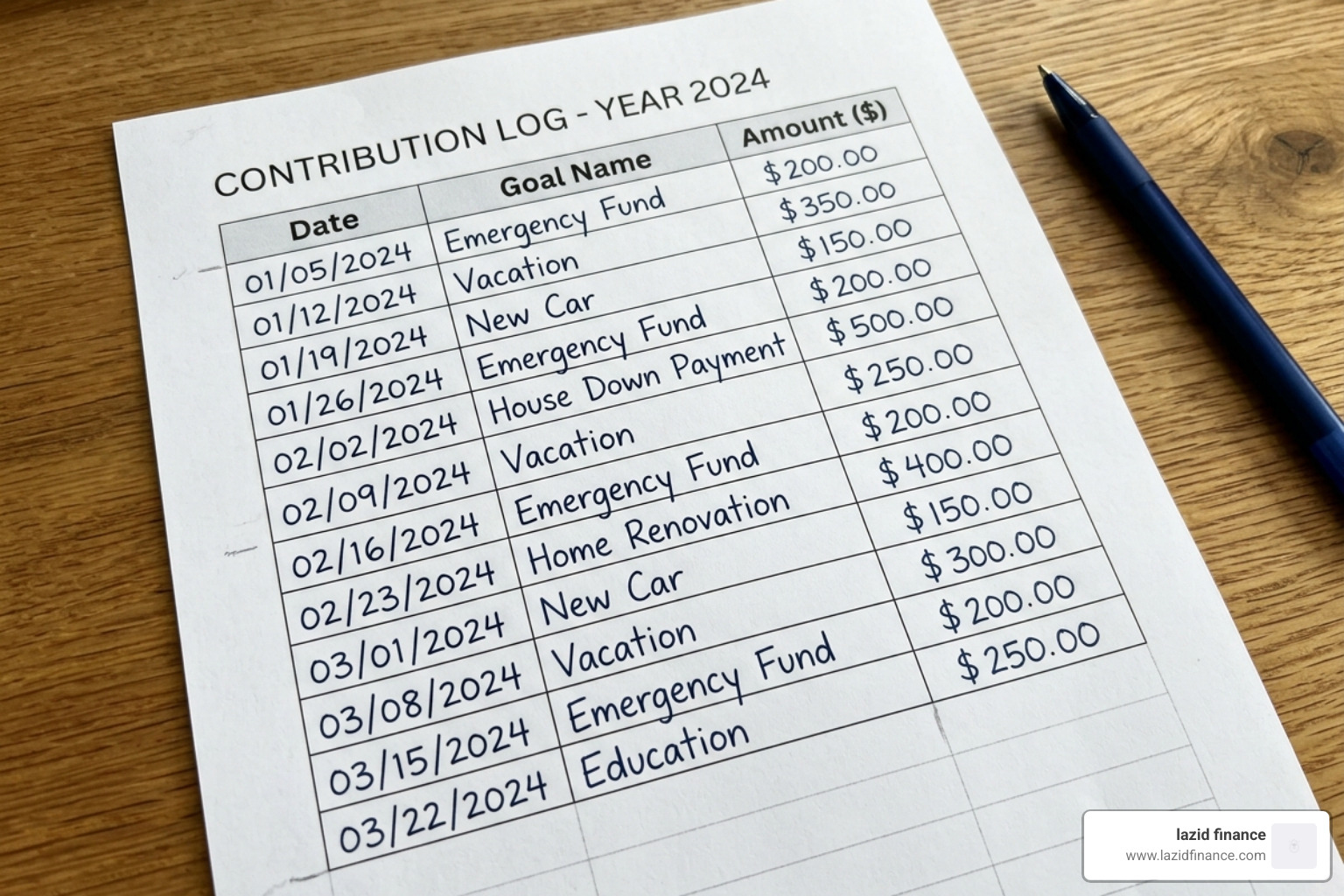
To keep these challenges organized, a dedicated Savings Tracker Template | BudgetJar can help you log every contribution and see your cumulative total. These trackers often include specific “check-off” boxes for each week or envelope, making the process feel like a game.
How to Choose and Set Up Your Savings Tracker
With so many options, how do you pick the right savings tracker template? We recommend choosing based on your “financial personality.”
- The Automator: If you want to “set it and forget it,” go with a Google Sheet. Set up automatic transfers from your checking to your savings account on payday, then just check the sheet once a month to see the magic happen.
- The Artist: If you love journaling and stationery, a printable from Pinterest or Canva will keep you engaged.
- The Professional: If you manage complex finances or a small business, a robust Excel workbook with year-end reporting is the way to go.
When setting up your tracker, clarity is key. A common mistake is trying to track too many goals at once. We suggest starting with 3–4 primary goals (e.g., Emergency Fund, New Car, Vacation). Give each goal a specific name, a target amount, and a realistic deadline.
For a simple starting point, check out this Savings account tracker template – Google Sheets. It’s a clean, no-frills way to see your progress across multiple accounts.
Step-by-Step Guide to Using a Savings Tracker Template
Ready to dive in? Here is our foolproof method for getting started:
- Select Your Template: Choose from the digital or printable options we’ve discussed.
- Define Your Goals: Be specific. Instead of “Save for a house,” write “Down payment – $50,000.”
- Set a Deadline: A goal without a date is just a wish. Determine when you need the money.
- Calculate the Monthly Requirement: Divide your total goal by the number of months until your deadline. Does this fit into your 20% savings bracket from the 50/30/20 rule?
- Log Your Starting Balance: If you already have $500 in a jar or account, put that in the “Starting Amount” cell.
- Update Regularly: Set a recurring calendar reminder (weekly or monthly) to log your contributions. Consistent naming is vital for spreadsheet formulas like
SUMIFto work correctly. - Monitor Your Status: Look at your “Percentage Complete.” If you’re at 75%, you’re “Almost There!” If you’re below 25%, you’ve “Just Started.” Both are worth celebrating!
Frequently Asked Questions about Savings Trackers
How much should I aim to save each month?
Financial experts generally recommend saving at least 10% of your gross income, but if you want to follow the “Pro” route, aim for 20% of your net income using the 50/30/20 rule. If that feels impossible right now, start with 1% and increase it by 1% every month. The habit is more important than the amount when you’re starting out.
What is the difference between a savings tracker and a budget?
A budget is a plan for your money — it tells your dollars where to go before the month starts. A savings tracker template is a log of your progress toward specific goals. Think of the budget as the map and the tracker as the GPS showing how far you’ve traveled. While they work best together, a tracker is specifically focused on the “accumulation” side of your finances.
Can I track multiple savings goals in one template?
Absolutely. In fact, we recommend it. Using a single dashboard for all your “sinking funds” (vacation, emergency, car repairs) prevents you from feeling overwhelmed by multiple accounts. Most modern templates allow you to track up to 10 or 15 goals in one place, automatically summing up your total “net savings” across all categories.
Conclusion
At Lazid Finance, we believe that financial empowerment comes from making conscious, mindful choices every single day. Achieving your dreams—whether that’s a home of your own, a stress-free retirement, or a trip around the world—starts with the simple act of tracking your progress.
A savings tracker template is more than just a grid of numbers; it’s a tool for clarity and a roadmap to freedom. By picking a method that resonates with you and sticking to it, you’re joining the minority of people who are no longer just surviving paycheck to paycheck, but actively building a legacy.
Don’t wait for “someday” to start saving. The best time to start was yesterday; the second-best time is right now.
CLICK HERE TO CREATE PERSONAL MONTHLY BUDGET TEMPLATES

